
BiP - Messenger, Video Call
Turkcell İletişim Hizmetleri A.ŞCommunication
4.02.91K Reviews
- Version
- 5.1.23
- Installs
- 100.00M
- Age Rating
- Everyone
Screenshots


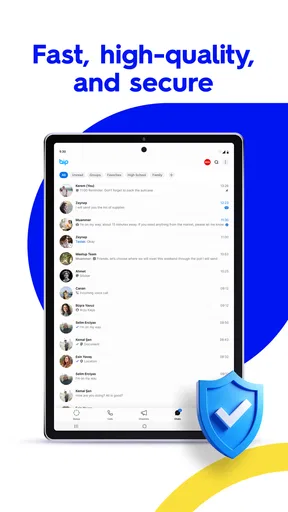

Our Review of BiP - Messenger, Video Call
 Analysis by Appyee
I judge a messaging app less by how much it can do on day one than by whether it earns a place in my routine a few weeks later. BiP - Messenger makes a lively first impression: it brings chats and calls together with extras that invite a little exploring. The more useful question is whether those extras support the way you communicate, or simply make an already busy phone feel busier.
What makes the first week appealing
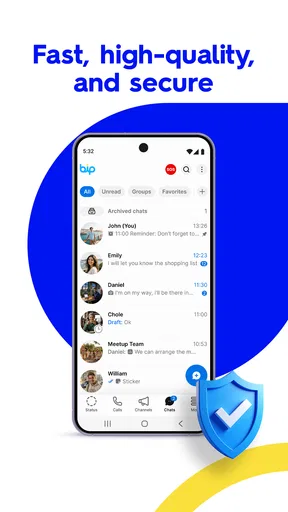
BiP is a communication app developed by Turkcell İletişim Hizmetleri A.Ş. Its basic appeal is easy to grasp: I can message people, make voice and video calls, share my location, and use the same app for other content. The interface feels approachable, so a new user can get to the central conversation tasks without a long learning period.
The app has a 4.0 average from around 1.3 million ratings, and it has passed 100 million installs. Those figures suggest it has reached a broad audience, but they don’t answer the question that matters most to me: are the people I actually want to talk to available there? A messaging app is only as useful as the contacts who will use it with you.
Calls are a major part of the pitch, especially when a quick text is not enough. An HD video call can make a catch-up feel more personal, while location sharing can help in a practical moment, such as coordinating a meeting point. I would treat these as useful options rather than reasons by themselves to move every conversation over from another service.
How it fits into everyday communication
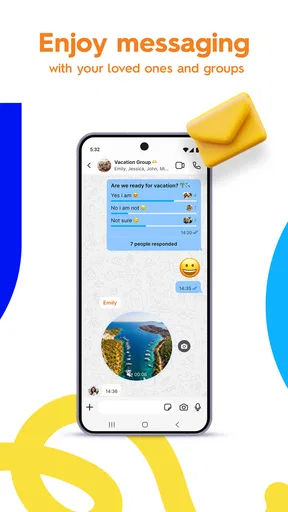
In a normal week, I would use BiP most naturally for a small circle: family members who prefer calls, friends who are willing to keep another messenger installed, or a group that wants one place for updates. A realistic use is coordinating a family visit: send the plan in a group chat, share a location if someone is having trouble finding the meeting spot, then switch to a call when typing becomes cumbersome.
Group chats can accommodate up to 1,000 people, which gives the feature room to serve large communities as well as a household or a handful of friends. That capacity is not automatically an advantage for every group. In a large chat, the practical challenge is keeping important details visible among the replies. I would use a big group for announcements or broad coordination, and keep sensitive or time-critical conversations smaller.
Instant translation is the more distinctive tool in my day-to-day judgment. It can help when two people do not share a strong common language, or when a mixed-language group needs to understand the gist of a message. I would still pause before relying on an automatic translation for delicate wording, directions with consequences, or anything that needs exact nuance. It can lower the barrier to starting a conversation, but it is not the same as a careful human interpretation.
What keeps it useful after the novelty
The Discovery area adds games, news, and other entertainment options, so BiP is not limited to a blank chat list. That variety may be welcome if I like opening one app for communication and light browsing. It may matter less if I already have separate apps for news and games and prefer my messenger to stay focused. The long-term value depends on whether I return to those extras, not just whether they look interesting on the first day.
Stickers and emojis give conversations a more playful tone without changing how the app works. They are handy for casual exchanges, but they are not a reason to switch a whole family or group. For lasting use, dependable habits count more: people need to check the app, respond there, and know which channel is being used for important plans.
BiP is free to download and is rated for Everyone. It includes in-app purchases, with listed item prices ranging from $0.49 to $294.99, so I would keep that in mind if a child will use the app or if I prefer not to make optional purchases. Its current version is 5.1.23, and the listed minimum operating-system requirement is 7.0. I would check compatibility on the device before planning a move, especially if an older phone is involved.
Maintenance, friction, and who should choose it
The main maintenance burden is social rather than technical: getting the people I care about to install and regularly check another messaging app. If my friends already organize everything in a different messenger, splitting conversations can create missed replies and uncertainty about where plans were made. I would first invite a small, active group and agree on what belongs in BiP, rather than asking everyone to migrate at once.
There can also be ordinary friction. Notifications may arrive late at times, and the app’s speed has room to improve, which matters more when I depend on it for a prompt response than when I use it for casual chat. If a message is urgent, I would not assume that a single notification guarantees the other person has seen it. A direct call or an agreed backup channel is more sensible for time-sensitive coordination.
Compared with a stripped-down messenger, BiP offers more in one place: calls, location sharing, translation, and Discovery alongside messaging. That breadth is its clearest trade-off. Someone who wants a focused chat tool and already has reliable calling elsewhere may prefer a simpler alternative. Someone whose contacts are willing to use BiP, and who values translation or the combination of chat and video calling, has more reason to keep it installed.
What's BiP All About?
Alright, so BiP - Messenger isn’t just your average texting app. It’s got a whole slew of features that make it stand out in the crowded world of messaging applications. You can send messages, make voice and video calls, and even share your location. But wait, there’s more! It’s packed with a bunch of other goodies, like games and news feeds, all tucked neatly into one app.
Features That Make BiP Shine
One of the first things I noticed was how smooth the interface is. It's user-friendly and doesn’t take long to get the hang of. Here are some cool features that caught my attention:
- HD Voice and Video Calls: Crystal-clear quality that makes you feel like you're right there with your friend or family member.
- Group Chats: You can add up to 1,000 people in a single group. Now that’s what I call a party!
- Instant Translation: This feature is a lifesaver if you’re chatting with someone who speaks a different language. It supports multiple languages and translates messages on the fly.
- Discovery: A hub for games, news, and other entertainment options. It’s like having a mini-entertainment center in your pocket.
The Experience of Using BiP
So, how does it feel using BiP in the real world? Honestly, it’s pretty seamless. The messaging is snappy, and video calls connect without much of a hitch. I tried both Wi-Fi and mobile data, and the performance was consistent.
The app’s design is clean and easy on the eyes. You won’t be fumbling around trying to find settings or features, which is a huge plus in my book. And let’s talk about those stickers and emojis! They're fun and add a nice touch to any conversation.
Why You Might Want to Give BiP a Try
If you’re in the market for a feature-rich, reliable messaging app, BiP is definitely worth a shot. Whether you’re looking to connect with friends across the globe or just want to chat with family, it’s got you covered. Plus, the added extras like games and news make it more than just a messaging app.
I especially love the instant translation feature. It’s perfect for those of us who love connecting with people from different cultures. It breaks down language barriers and makes communication a breeze.
Things to Keep in Mind
While BiP is a solid choice, it’s important to note that like any app, it’s not perfect. Sometimes, the notifications can be a bit delayed, and there’s room for improvement in the overall speed of the app. But honestly, these are minor hiccups in an otherwise stellar experience.
Overall, BiP - Messenger is an app that packs a punch. It’s not just about messaging; it’s a complete communication hub. If you haven’t tried it yet, I’d say it’s worth downloading and giving it a spin.
My long-term verdict
For me, the strongest reason to keep BiP is a repeatable routine: the same people answering in the same place, with calls and translation available when a text thread is not enough. I would not install it expecting every contact to move over, and I would not choose it solely for the extra entertainment. Start with one group that has a clear reason to use it, then see whether it naturally becomes part of your week.
If that group sticks with it, BiP can earn its space as a practical communication hub. If conversations remain scattered elsewhere, the added features may not outweigh the effort of checking another inbox. I’d recommend giving it a try when its combination of messaging, calls, location sharing, and translation fits a real need; if simplicity and an established contact network matter more, staying with the messenger your circle already uses is the better choice.
Verdict
Strengths of BiP - Messenger, Video Call
- User-friendly interface for easy navigation.
- High-quality video and voice calls.
- Wide range of fun stickers and GIFs.
- End-to-end encryption for privacy.
- Multi-language support enhances accessibility.
Limitations of BiP - Messenger, Video Call
- Can be resource-heavy on older devices.
- Occasional connectivity issues reported.
- Limited customization options for chats.
- Ads may interrupt user experience.
- Some features require in-app purchases.
Similar Picks in This Category
View All
Google Messages
Google LLC4.6

Gmail
Google LLC4.1

Google Meet
Google LLC4.4

Google Chrome
Google LLC4.1

WhatsApp Messenger
WhatsApp LLC4.6

Carrier Services
Google LLC4.2
Frequently Asked Questions
What features does BiP - Messenger, Video Call offer?
BiP provides a comprehensive suite of features including text messaging, voice and video calls, multimedia sharing, and group chats. It also offers unique features like BiP Discover, which allows users to follow channels for news and entertainment, and BiP Translate for in-app translation of messages into different languages.
Is BiP - Messenger, Video Call secure for communication?
Yes, BiP uses end-to-end encryption to ensure that all communications, whether text or calls, are secure and private. This means that only the sender and the recipient can read the messages or hear the calls, providing peace of mind for users concerned about privacy.
Can I use BiP without an internet connection?
While BiP requires an internet connection for most of its features, it offers BiP Offline, which allows users to send free text messages to non-BiP users via SMS when offline. This feature ensures communication continuity even when your data connection is unavailable.
Is BiP available for both Android and iOS devices?
Yes, BiP - Messenger, Video Call is available for download on both Android and iOS platforms. Users can easily find the app on the Google Play Store for Android devices and the Apple App Store for iOS devices, making it accessible to a wide range of users.
Does BiP support group video calls?
BiP supports group video calls, allowing up to 10 participants to join a single video call session. This makes it ideal for virtual gatherings, business meetings, and family get-togethers, providing clear video and audio quality for an enjoyable experience.
